01
After two failed AI rollouts, I ask first: for whom, to fix what, and how we’ll know
I pushed AI tools on my design team twice and nobody changed how they worked. Then I learned to pick a person, a problem and a number first, and used it to cut my own résumé tailoring from two hours to fifteen minutes.
The 30-second version
- The problem
- The company wanted to “adopt AI”. I pushed it on a design team of five to ten twice, in 2023 and 2024: one talk demoing tools, one on how I read the whole thing. Both went down well. Nobody changed how they worked, and the request for a paid seat wasn’t approved.
- What we did
- I took it apart. A talk only gets people through the first of four steps to actually using a tool. Before starting I should have settled who it’s for, what it fixes, and what counts as working, and I hadn’t settled any of them.
- Result
- I still pay for the account myself. Now I start with one step I can time, measure it, change it, and let the number do the talking. Using that on my own résumé workflow took one application from about two hours to about fifteen minutes.
My part
- Working out what the tools could actually do
- Trying everything, settling on the mainstream three
- Two sessions — both of them step one
Platforms
- Figma
- Framer
- Uizard
- Galileo AI
- ChatGPT
- Adobe Generative Fill
Team
- A design team of five to ten
Client & timeline
- D-Link — internal
- 2023.07 · 2024.12
What happened
Two talks about AI, and nobody changed how they worked
In July 2023 and December 2024 I ran an AI tools session for a design team of five to ten. The first time I demoed Photoshop's Generative Fill with nine before-and-afters. The second time I talked about how I read the whole situation, over 36 slides. Both went down well. Afterwards, nobody worked any differently.
- 2
- talks, 18 months apart
- 36
- slides the second time
What I missed
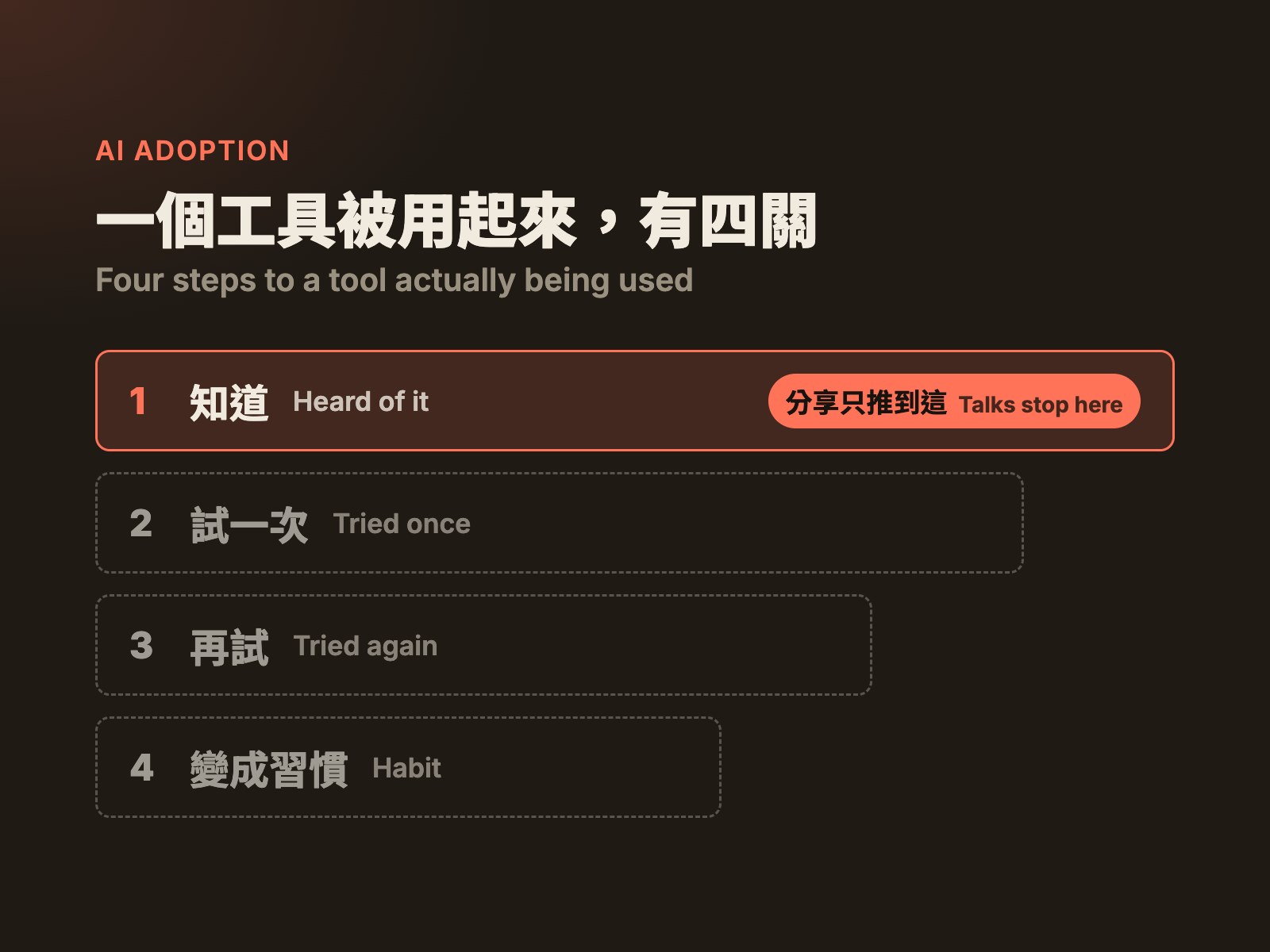
Getting a tool used takes four steps
A talk only moves people through the first one. I did the first step twice and never thought about the other three.
- 1
Hearing that it exists.
- 2
Opening it once.
- 3
Getting a bad first result and trying again anyway.
- 4
Putting it into how you actually work.
Three blanks
No person, no problem, no number
These should have been settled before I started. Because they weren't, when the free tiers ran out and I asked the company to pay for a seat, I had nothing to argue with. It wasn't approved, and I've paid for that account myself ever since.
- 1
Who it's for. I presented to everyone, but a fast senior designer saves almost nothing while someone new to a task can save a day. I should have picked the two or three people with the biggest gap who wanted to try.
- 2
What it’s for. I was handed “adopt AI”, which is an answer, not a question.
- 3
What counts as working. I never said, so nobody could tell whether it worked, including me.
The use case I missed
The AI use case that was right in front of me
The answer was right there. Back then, a project needing an image meant buying stock, and buying stock meant a licensing sign-off, which meant waiting. My recollection is about one to two weeks a round (I didn’t keep records, so that’s an estimate).
If I’d taken that to the conversation, the proposal should have been: “For two projects, replace stock with generated images, and measure the wait and the spend.” Not a 36-slide deck.
Looked at as a PM, it’s close to a textbook AI use case:
- 1
Painful and frequent. Every project hit it, and it held up the whole schedule, not just the designer.
- 2
Measurable. Days waited and money spent on stock, before and after.
- 3
Within what AI could do. Image generation was already good enough for mood shots and illustrations.
- 4
Risks to settle up front. Who owns a generated image and whether it can go into external material needs a check with legal; official brand assets may still have to be bought.
What I got right
I read the technology right
Everyone was asking whether AI would replace designers. That question is so big no answer is wrong, which makes it useless. I asked something smaller: design has five layers, so which ones has AI reached? At the end of 2024 my answer was the top two: a sentence becomes a screen, colours, layout, layer names, sketches turned into UI. Below that it starts to fall apart. Two years on I’d draw that line in about the same place.
Picking tools works the same way. I’ve tried a lot, and settled on three: Claude, Codex and Gemini. Three criteria: quality, how easy it is to use, and speed. I settled on the mainstream ones because they improve so fast that niche tools get overtaken within months; betting on the mainstream keeps the learning cost lowest.
But this is reading the technology, not making a product decision. It tells you what a tool can do, not whose week gets shorter or how you’ll know afterwards that it worked.
The line I drew at the end of 2024:
AI can do it
- Surface
- Skeleton
Screens from a sentence, colours, layout, sketches turned into UI
Still needs a person
- Structure
- Scope
- Strategy
How features add up to a product, and balancing what the business and users want
Used it once
Using the framework once, on my own résumé
Job hunting this year, every application meant tailoring a résumé to the role, about two hours each. This time I followed my own framework:
Who it’s for. Me. I’m applying to a lot of places, so I’m the one it hurts most.
What it fixes. Not “write my résumé with AI”, but the chores around the edits: reading the posting, finding the matching lines, copying versions, exporting the PDF, writing the cover letter.
What counts as working. How long one takes, and whether there are fewer mistakes.
One application went from about two hours to a conversation of about fifteen minutes. On its first run it also caught the same mistake repeated 45 times across 18 of my old résumés.
I put a checkpoint in the middle: the AI lists the edits it wants to make and stops until I approve them. When I later ran a free model for comparison, it really did invent experience I don’t have; that checkpoint is what catches it. (I wrote up the whole thing on Medium.)
- 2h → 15m
- per tailored résumé (approx.)
- 45
- repeated mistakes caught across 18 résumés
Next time
Next rollout, I’ll track four numbers
One number for each of the four steps. And the talk goes last: a talk is for people who already want the tool. It doesn’t create them.
- 1
Heard of it → how many people have seen a demo
- 2
Tried it once → how many opened it and finished one real task
- 3
Tried again → how many are still using it in week two
- 4
Made it a habit → time saved per use, against the number measured at the start